Community Management Handbook
This handbook is an overview of how to moderate and manage the Gamer Dorks communities. Please read all the way through if you are currently a Helper, Moderator, Sr. Mod, Sr. Dev, or Administrator; or if you intend to join one of these teams.
Why We Moderate
The ultimate purpose of moderation in our community is to make the community more safe and harmonious. The rules exist for the community, not the community for the rules.
If at any time we discover that the rules do not meet this ideal, they should be changed. If at any time we decide someone is actively making the community less safe and more chaotic, they will be removed by Leadership, even if they broke no rules.
Keep this ideal in mind whenever you moderate our community and let it guide your decisions.
Tips for Good Practice
When moderating members of the community,
- Always include the relevant rule numbers and letters in your punishment message, as well as the ruleset.
- Example: “GDUR rule 3b: Political discussions are not allowed!”
- If you are in a hurry to get a troublemaker out of the way, you don’t have to make your punishment message thorough. You can always edit it later.
- If your work is taking a toll on your mental state, ask another member of the team to take over for you once they arrive. This is required if you are getting angry or excessively irritated with a situation.
And here are some things to avoid:
- In Discord, avoid using commands from other bots or through the default UI. All punishments should be done through YAGPDB.xyz. The only exception is to deal with raiders. When dealing with raiders, get rid of them as quickly as possible.
- Never give “verbal warnings”. When you want to inform someone that their behavior is not acceptable, you should use a warning command. This way it gets logged and they know to take it seriously. Don’t just tell them in chat.
Moderator Tools: Discord
Run commands using the YAGPDB.xyz bot to hand out punishments and save moderator notes.
- /warn [user] [message]
- Permission Level: Helper
- Send a note to the specified user. It is sent to the recipient via direct messages.
- Use this for first-time, low-severity punishments.
- Related commands: /warnings, /clearwarnings, /delwarning, /editwarning, /topwarnings.
- /timeout [user] [duration] [message]
- Permission Level: Helper
- Puts the specified user in timeout for the specified duration, and sends them the message via direct messages.
- Use this for second-time or medium-severity punishments.
- Related commands: /removetimeout.
- /kick [user] [reason]
- Permission Level: Moderator
- Removes the specified member from the server, but they can come back at any time. They are notified via direct messages.
- Use this for suspicious compromised accounts that aren’t doing anything especially dangerous.
- /ban [user] [duration] [reason]
- Permission Level: Moderator
- Removes the specified member from the server, and they can’t come back. They are notified via direct messages and receive the appeal link.
- Duration is optional. Leave blank for permanent ban.
- Use this for repeat offenses or for high severity punishments.
- Related commands: /unban.
- /clean [amount]
- Permission Level: Moderator
- Deletes the specified number of messages. Can specify user or regex filter.
- Use this to clear messages sent by spammers or raiders, or to delete an argument that could be restarted by people reading it.
Moderator Tools: Steam Group
Hover over comments or posts in the Steam Group to perform moderator actions.
- Delete – Removes a comment.
- Report – Hides a comment and reports it to steam.
- Ban – Removes a user from the group, they can’t rejoin. Also allows you to purge all messages from a user. Requires the Senior Moderator role or higher (the Officer rank in the Steam Group).
Severity
Many scenarios will be rated by their severity and given an example first-time punishment. If you did not give a user any other punishment when they broke a rule, warn them. Delete any messages that break the rules. Delete entire conversations if you have to. Review the rules here: https://gamerdorks.net/rules
GDUR Rule 1: Support
- If someone is sharing their own passwords, multifactor authentication keys, or personally identifiable information, delete the message.
- If someone submits a blank report, warn them and mark it as resolved.
- If someone submits a false report to harm the reputation of another user, give the false reporter the same punishment that you would have given the other user, had the report been true.
- If someone makes a complaint or report in chat, handle it and warn them for contacting us incorrectly.
- Ignore direct message reports.
GDUR Rule 2: Respect
- General harassment or bullying should result in a 1-hour mute.
- Persistent, high effort, or extreme harassment should result in a permanent mute.
- Intentional discrimination should result in a permanent ban. This includes use of slurs, saying anything overtly hateful, or intentional misgendering / deadnaming.
- Non-intentional discrimination should result in the rulebreaker being warned and shown the Inclusivity Statement page on our website. This includes unintentional misgendering, saying common phrases that result from a background of unintentional discrimination such as “men don’t cry”, “being gay is a sin”, or “I don’t believe in pronouns”.
- If someone shares personally identifiable information about someone else, or encourages them to share their own personal information, give them a 1-week mute. Second offense should be a permanent ban.
- If someone excuses breaking the rules by saying “it’s just a joke”, warn them.
- If someone pushes the boundaries of others by interacting with them in a way they don’t want to be interacted with, mute the perpetrator.
- If someone encourages others to break the rules, not knowing it’s not allowed, warn them and everyone who broke the rules.
- If they do know it’s not allowed, permanently ban the instigator and warn everyone else involved.
- Threats of any sort, such as threatening to revealing someone’s personal information, threatening real-world harm, or threatening digital attacks, should result in a permanent ban.
GDUR Rule 3: Content
- NSFW (sexual / gore) images should result in a permanent ban. Includes shock content.
- Topics regarding the use or abuse of substances should result in a 5-minute mute.
- Political or religious discussions should result in a warning. If it becomes an argument, give 1-hour mutes to everyone involved. This also includes content regarding laws and borders.
- Burning or desecration of knowledge or symbols should result in a permanent ban.
- Glorifying fascism should result in a permanent ban. This includes glorifying figures such as Hitler, Donald Trump, and Vladimir Putin.
- Self-harm topics should result in a 1-hour mute. We are not required to deal with such topics, and in some countries it may even be illegal.
- Abuse topics should result in a 1-hour mute.
- Jokes about tragedies (i.e. 9/11) should result in a warning. If it seems particularly inflammatory, also give them a 1-hour mute.
- Jokes about human rights violations (i.e. the holocaust) should result in a permanent ban.
- Non-sexual nudity images should result in a warning and post deletion. Second-time offenses should result in a permanent ban.
- NSFW text posts should result in a 1-hour mute, this includes innuendo and jokes.
- Overt, gross attempts at E-dating should be met with a permanent ban. Less overt attempts such as “who here is single” should result in a warning.
- NSFW roleplay or user-generated content should result in a permanent ban.
- Illegal activity should result in a permanent ban. When determining if something is illegal, reference United States federal law. Work with the team to take necessary steps to report it to law enforcement.
- Bypassing the chat filter should result in a warning on its own. If it was bypassed in order to say a slur, or to harass another player, increase whatever punishment they would have received for those offenses.
GDUR Rule 4: Proper Conduct
- Speaking the incorrect language in a public channel (including made-up languages like Pig Latin) should result in a warning.
- Repeated messages should result in a 5-minute mute.
- Repeated chat flood should result in a permanent mute.
- Single instances of ascii art in Discord (such as the “this is bob” skeleton art) should result in a warning.
- Trolling should result in a permanent mute.
- Advertisements immediately upon joining one of our services should result in a permanent ban. If it’s an Affiliate, request an Administrator instead.
- Advertisements as a long-time member of our services should result in a warning. If it’s an Affiliate, request an Administrator instead.
- Excessive misuse of Discord channels should result in a warning.
- Excessively talking over others in voicechat should result in a warning.
- Playing music or loud repetitive noises in voicechat should result in a voicechat mute, if possible. Otherwise, a normal 1-hour mute should suffice.
- If someone has a lot of background noise, ask them to turn on push-to-talk. If they refuse, treat it as loud repetitive noises.
- Impersonation should result in a warning. If they are using it to manipulate others, give them a permanent ban.
GDUR Rule 5: Platform Guidelines
- Encouraging others to cheat or pirate should result in a 1-hour mute.
- Sharing cheat or pirated software should result in a permanent ban.
- Encouraging others to or bragging about breaking the rules of other services or communities should result in a 1-hour mute.
- Failing to follow Discord terms of service in the Discord server should result in a permanent ban. This includes being under the minimum age limit.
GDUR Rule 6: Staff Interaction
- If a staff member breaks the rules, immediately report it with a Contact Management ticket through our support ticket system. If the website is unavailable, email contact@gamerdorks.net.
- Calling out a staff member publicly for any type of abuse should result in a warning.
- Ignoring or insulting staff should result in increased punishment. Whatever punishment they would have received, make it more severe.
- People who worship staff members should be given a warning. This includes things like begging to be friends with staff because they are staff, or giving staff unnecessary praise because they are staff. If it makes you uncomfortable, this rule likely applies.
- Use of loopholes should result in increased punishment.
- Minimodding should result in a 5-minute mute.
- Failure to report major issues should result in a warning.
- Hurtful/destructive complaints should result in a 5-minute mute.
- Complaints outside of the proper channels should result in a warning. Direct them to the correct channels.
GDUR Rule 7: Child Safety
- Underage participants of our services should be banned. If you know their age, ban them for until they are old enough.
- Discord’s age requirement is 13 years old.
- If someone is acting generally creepy toward children, permanently ban them.
- If someone is proven to be predatory toward children and there is solid evidence, permanently ban them and report them to the local or national authorities if possible.
- If a child shares inappropriate content of themself, permanently ban them.
GDUR Rule 8: Exceptions
- See “Staff Interaction” for how loopholes will be handled.
- If someone does “extreme behavior” on another platform, and you can prove a link between their user on that platform and on the Gamer Dorks platform, permanently ban them. The following activities are considered extreme behavior:
- Intentional Bigotry
- Violent Extremism
- Threats
- Illegal Activity
- Harassment
- Treat behavior on our Affiliate Communities or Affiliate Creators the same way you would on one of our services.
Target
Take into an account the target of an offense when a rule is broken.
- Retaliation is punishable, but give a smaller punishment to the retaliator than to the instigator.
- A troublemaker who targets a specific person because of their demographic or because of a vulnerability is participating in discrimination, so handle this situation accordingly.
History
Take into account the troublemaker’s infraction history when they break a rule.
- If someone breaks the rules multiple times, consider it higher severity.
- Regulars or long-time members of the server who are generally constructive should be given more leniency.
- Before banning a regular, discuss with the Moderator team.
- If someone has misbehaved on one platform (i.e. Discord) and got banned, then is misbehaving on another platform (i.e. Steam), consider it higher severity.
Respect
Always show respect to those who break the rules. They deserve dignity too, even if they don’t act like it.
- Only the rulebreaker, the staff team, and anyone negatively affected by them needs to know when action is taken.
- To respect the privacy of the rulebreaker, don’t share more than needs to be shared.
- Inform the rulebreaker when they have been moderated and why.
- Let the rulebreaker know how they can appeal bans or mutes. If you banned with YAGPDB.xyz on Discord, or with any of our in-game tools, they will be notified automatically.
Probable Cause
Make sure you have evidence before you take action.
- If someone reports an infraction with no evidence, briefly investigate it, but do not immediately take anyone’s word as fact.
- Solid evidence is required for moderating regulars or long-time members.
Acceptable evidence includes:
- Screenshots. Search for visual artifacts that could imply edits or unusual crops that could be leaving out context.
- Video recordings. Search for visual artifacts, strange cuts, or other signs of edits.
- Message links.
- Log files.
If any evidence seems like it could be fake, reject it.
Logging
In order to keep records of punishments made, log any punishment you make in the #modlogs channel of the Staff Discord.
- You are required to log any mute or ban that lasts longer than 1 day.
- Please log other punishments as well when possible.
- You are not required to log punishments on members that first joined the service within the last 15 minutes.
- Any punishment that does not have a valid log can be appealed and immediately accepted because there is no valid evidence to the contrary. This includes punishments in the two above exceptions.
- Log any punishment where you think the next one should result in a permanent ban. (i.e. if you administered a Final Warning).
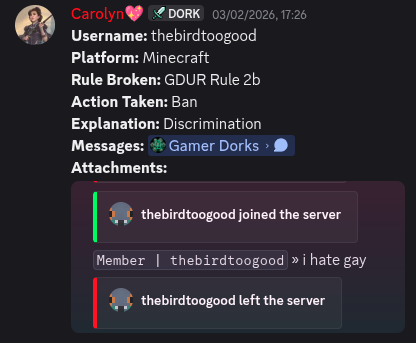
- The log format is available in the pinned messages in #modlogs.
Step by step process:
- Open the pinned messages in the #modlogs channel and copy the format. You can select the text in the code block on PC or right-click and copy the plain text message below it on mobile.
- Fill out every entry in the logs format. Do not remove any of them. If you have to leave them blank for any reason, write “N/A”.
- If for any reason you can’t complete a modlog, set a reminder for yourself or ask someone here to make one on your behalf.
And remember,
- Don’t chat in the #modlogs channel.
- Reference the rules when you need to fill out Rule Broken. You can use acronyms like GDUR or MRP. You don’t need to write out the whole thing.
- Avoid leaving something blank just because you can’t be bothered to fill it out.
- Avoid referencing “the message above” or “it’s in the automod channel” for your evidence. Provide actual message links and attach a screenshot to the message wherever possible.
- It’s important to get these modlogs correct. They keep us consistent in the way we handle situations and allow us to refuse appeals when we need to. They help new members of the team learn proper conduct as a moderator.
Below is an example log using the proper format and evidence.
Optional Tasks
There are several optional tasks you are welcome to participate in as a member of our Community Management team.
- Support – [Moderators and above only]. Receive and handle support tickets, such as:
- General Inquiry
- Player Reports
- Bug Reports
- Staff Applications
- Punishment Apeals
- Events – Plan and host events with our community.
- Website – Write posts and blogs for our website.
- Wiki – Edit and manage a wiki for one of our games or game servers.
- Social – Make posts or videos for our social media accounts, on platforms like:
- BlueSky
- Hey.Cafe
- YouTube
- Twitch
- TikTok
If you wish to assist in any of these roles, please let us know in the appropriate channel in the Gamer Dorks Staff server and we’ll get you set up in that role!